Stanford Payroll is responsible for paying all employees. This page provides information about paycheck delivery, pay dates, pay periods and pay statement field descriptions.
Direct Deposit
- Employees are encouraged to sign up for direct deposit using the Stanford Axess website. Funds are automatically deposited to the employee’s bank account(s) each payday. There is no fee for this service.
- Employees can elect a single bank account for the direct deposit or multiple accounts. Employees can also select the amount of the deposit(s) based on a percentage of the total paycheck, a specified dollar amount or the balance of pay.
- Employees can enroll, update or cancel direct deposit elections at any time from the Stanford Axess website.
- Employees can view pay statements for the current and historic pay periods from the Stanford Axess website. Online pay statements are generally available to view two business days before payday.
- Employees who choose direct deposit may elect to receive a paycheck advice notice delivered to their ID mail code. The advice notice includes the same information as the online pay statement.
Hard Copy "Live" Checks
- The default paycheck delivery option for employees is a hard copy "live" check. With this option, it is the employee's responsibility to physically cash or deposit the check to a bank account each pay period.
- Hard copy "live" paychecks are delivered to the employee's US Mail address on paydays. To update a mailing address, see How To Update Address for W-2 and Check Mailing.
Pay dates for all Stanford employees are the 7th and the 22nd of each month. Pay dates correspond to pay periods as follows:
- For pay periods beginning on the 16th and ending on the last day of the month, the pay date is on the 7th of the following month.
- For pay periods beginning on the 1st and ending on the 15th of the month, the pay date is on the 22nd of the same month.
If the pay date falls on a weekend or holiday, pay is dispersed on the nearest preceding business day. For example:
- When the 7th or 22nd falls on a Saturday or Sunday, pay is dispersed on the preceding Friday.
- When the 22nd falls on Thanksgiving, pay is disbursed on the preceding Wednesday.
Note about your 12/31 pay statement: Year-to-date totals on your pay statement have been reset to reflect the new tax year. Annual benefit deductions and retirement contributions will begin with this paycheck. Social Security and VDI taxes are withheld again for those employees who reached the max in the calendar year. The tax year begins with the paycheck issued on January 7th of each calendar year for the pay period of Dec. 16 to Dec. 31 of the previous year. Refer to Resource: Payroll Schedules and Deadlines.
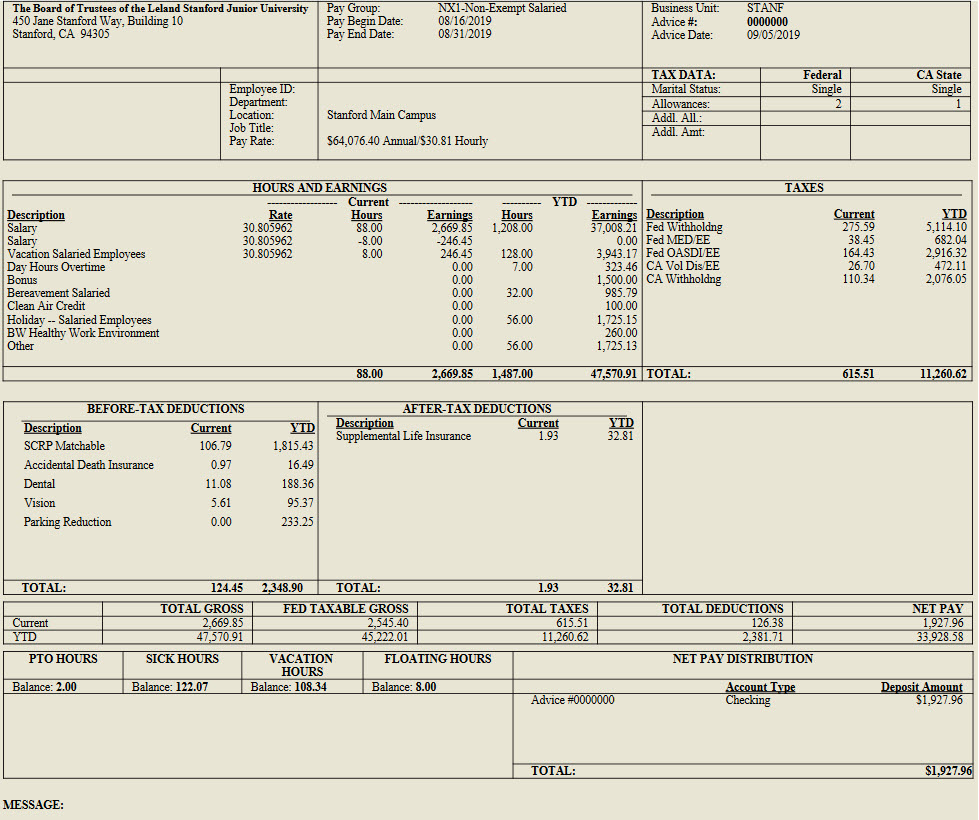
The following information is included on online pay statements, hard copy paychecks and paycheck advice notices.
- Pay Group: The codes used to classify employees for payroll purposes. Refer to Resource: Pay Groups and Descriptions.
- Pay Begin Date and Pay End Date: The beginning and ending dates for the pay period.
- Advice Date: The date a check is issued.
- Name: New employees need to verify the name on their pay statement matches their legal name on their Social Security card to ensure correct reporting of their wages for Social Security purposes. Notify your Human Resources manager or administrator immediately if anything is incorrect.
- Employee ID: The 8-digit Stanford employee identification number, which is also listed on the Stanford ID card. Use this number for identification when asking questions of Payroll or Benefits.
- Department and Location: The department and work location.
- Tax Data: The federal and state withholding status, allowances, and any additional amount or percentage specified for withdrawal from each pay period. For help changing withholding allowances, refer to How To: Declare or Change Income Tax Withholding Allowances.
- Hours and Earnings: Earnings paid by type (e.g., salary, sick, holiday or vacation) and, when applicable, the hourly rate and number of associated hours. Paychecks also include year-to-date (YTD) hours and earnings for each earnings type.
- Taxes: The federal and state tax amounts for the current pay period and YTD. Refer to Resource: Tax Deduction Codes, Descriptions and Rates.
- Before-Tax Deductions: The current and YTD deductions for benefits taken from the gross pay amount before taxes are applied. Refer to Resource: Benefit Deductions, Descriptions and Tax Status.
- After-Tax Deductions: The current and YTD deductions for benefits, other voluntary deductions or garnishments taken from the net pay after taxes are applied. Refer to Resource: Benefit Deductions, Descriptions and Tax Status.
- Paycheck Summary: The summary of current and YTD gross earnings, federal taxable earnings (this will correspond to Box 1 W-2 total), total taxes, total deductions and net pay.
- Accrual Balance: The accrued leave balances for vacation, sick time, personal time off (PTO) and floating holidays, cumulative of all active positions. Refer to Topic Overview: Time Reporting and Approvals.
- Net Pay Distribution: The amount of pay an employee receives by direct deposit or hard copy check.